 Library Doctor
Is your Plex library healthy?
Library Doctor compares what Plex shows with what's really on the disk and what Radarr and Sonarr think they have. Every morning you get one page with everything that needs fixing, and a button to fix most of it.
- Plex, Jellyfin or Emby
- Radarr and Sonarr
- Runs on your own server
- Docker, Unraid, Synology
- Open source (MIT)

How it works
Set it up once. Check it with your morning coffee.
No spreadsheets, no scripts, no clicking through five apps to work out why a film won't play.
It scans every night
At 3am it asks Plex, Radarr, Sonarr and your other apps what they think you have, then checks the disk. It never reads your video files, so the scan is quick.
One page in the morning
Everything that needs a look, sorted into checks, with a health score. A phone summary goes to Gotify, Discord, Telegram, ntfy, a webhook or email, but only if something changed.
Fix it with one button
Replace a broken file, keep the best copy, import a stuck download, convert an old .ts to MKV. Library Doctor checks again afterwards to make sure it worked.
What it checks
Eleven checks, one page
Each check says what it found and why, and offers a fix where there is one. If something is actually fine, press Ignore and it stays quiet.
Missing files
Plex, Radarr or Sonarr list a file that isn't on the disk, and aired episodes Sonarr never got.
Duplicates
Two copies of the same film or episode, and which one to keep and why. Editions like a Director's Cut are never counted.
Metadata gaps
"Episode 5" titles Sonarr knows the real name of, wrong years, and things Radarr or Sonarr don't know about.
File health
Broken files, files much shorter than they should be, and the wrong audio language, like an English film with only Russian audio.
Quality and space
Files far bigger than usual, old .ts and .avi files, weak episodes in a good season, and release groups that keep failing.
Subtitles
Subtitle files that are only adverts, names that no longer match the video, and what Bazarr is still looking for.
Unwatched
What nobody has played in a year, biggest first, through Tautulli. It never deletes anything for you.
Virus scan
Programs pretending to be films (film.mkv.exe), and an optional ClamAV scan of every new file.
App health
Warnings from Radarr, Sonarr, Prowlarr, Bazarr and Tdarr, apps that stop answering, updates, and indexers that never find anything.
Downloads
Finished downloads that won't import, stuck downloads with the real reason from your download client, and leftovers.
Disk space
Free space now, how fast it's filling, and roughly when it will be full.
Built to be careful
Nothing is deleted without asking
It was built on a real home server with about 7,500 films and episodes, by someone who didn't want to lose any of them.
- Read-only until you press a buttonIt only reads from your apps until you choose a fix.
- Its own trash, with undoClean-ups move files into a trash folder on the same disk. You can put anything back for 7 days, and the trash double-checks before it empties.
- Sure or CheckSurea tiny broken copy or a leftover temp file. Checktwo good copies, so have a look first.
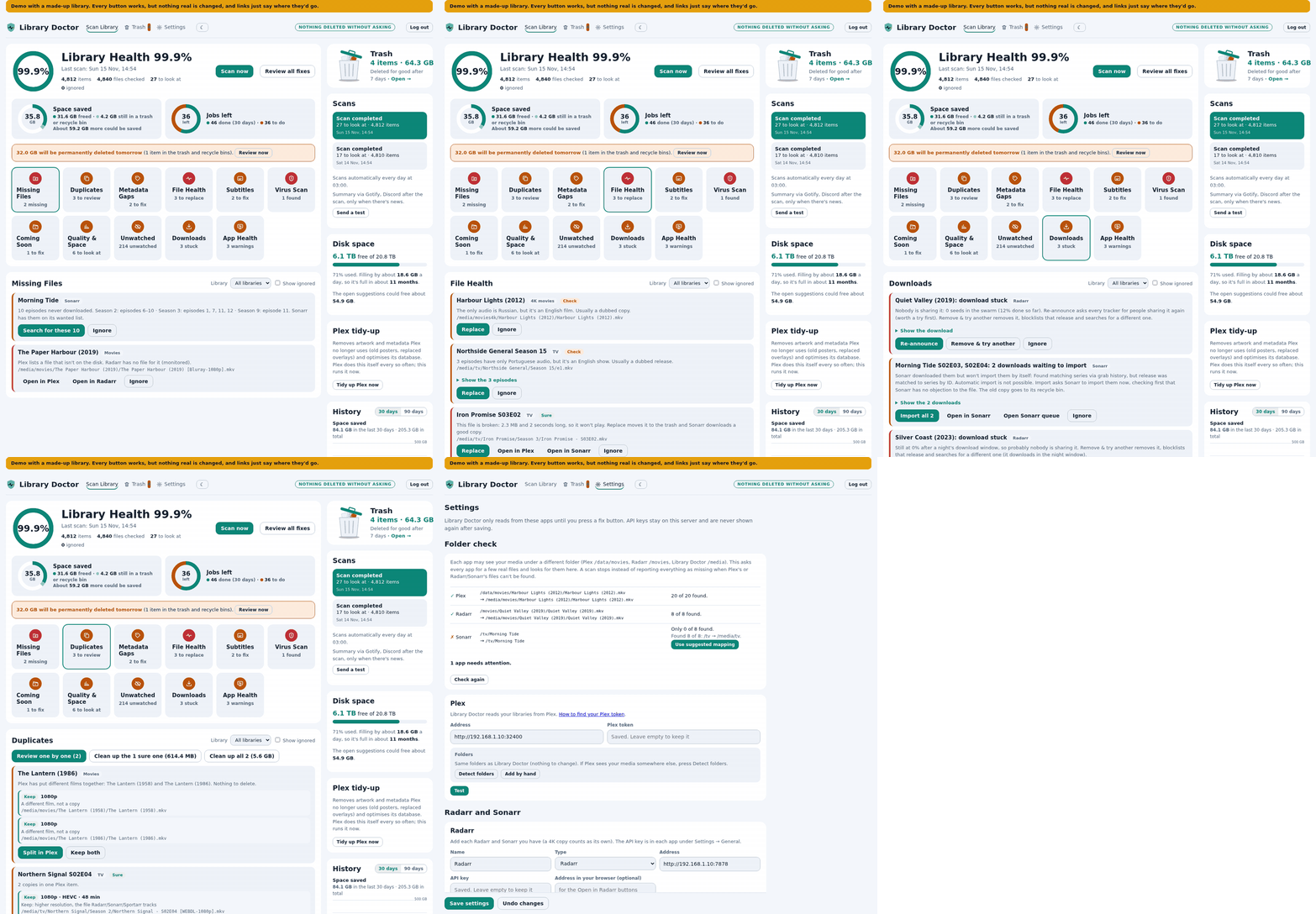
Click around, nothing breaks
The demo is the real app with a made-up library. Every button works, but nothing real is changed.
Install
Free, self-hosted, about five minutes
Library Doctor is one small Docker container. Your library details stay on your own server.
Docker Compose
- Make a folder and save this as
compose.yaml. Change the lines markedCHANGE:PUID/PGID(the owner of your media, fromls -ln /path/to/media), your time zone, and your media folder. - Run
docker compose up -d - Open
http://your-server:8790, set a password straight away, then add your media server and Radarr or Sonarr under Settings.
services:
  library-doctor:
    image: ghcr.io/spikey1965/library-doctor:latest
    container_name: library-doctor
    restart: unless-stopped
    ports:
      - "8790:8790"
    environment:
      - PUID=1000            # CHANGE: owner of your media folders
      - PGID=1000            # CHANGE
      - TZ=Europe/London     # CHANGE: your time zone
    volumes:
      - ./config:/config
      - /path/to/media:/media  # CHANGE: films and shows, read-write
    read_only: true
    tmpfs:
      - /tmp
    security_opt:
      - no-new-privileges:true
The full compose file has the optional settings (reverse proxy, ClamAV, scan time).
Unraid
Library Doctor is in Community Applications. Open Apps, search for Library Doctor and click Install. Set Media to the share with your films and shows, then open the WebUI and set a password.
Synology
It works in Container Manager on DSM 7.2, but you need to create the folders and set permissions first. The step-by-step Synology guide covers it.
Works with
The apps you already run
A media server and Radarr or Sonarr are all you need. Everything else is optional.
- Plex
- Jellyfin new
- Emby new
- Radarr
- Sonarr
- Prowlarr
- Bazarr
- Tautulli
- Tdarr
- qBittorrent
- Transmission
- SABnzbd
- NZBGet
- ClamAV
Questions
FAQ
Is it free?
Yes. Library Doctor is open source under the MIT licence and free to use. It's a beta, so please open an issue if something looks wrong.
Will it delete my films?
No, not unless you ask. It only reads until you press a fix button, and clean-ups move files into its own trash, where you can restore them for 7 days (3 to 30 in Settings).
Does it work with Jellyfin or Emby?
Yes, since version 0.2. Every check works on all three servers. A few Plex-only fixes are hidden on Jellyfin and Emby. Plex is still the most tested.
Where does it run?
On your own server as a Docker container: Linux, TrueNAS, Unraid or Synology. Keep port 8790 on your home network, or put it behind a reverse proxy with its own login.
Will it wake my sleeping disks?
The scan never reads your video files, it only checks that they exist and how big they are. On a NAS that spins its disks down, that can still wake them, so you can scan less often, for example once a week.
Who makes it?
My Media Build, a home-server blog with step-by-step guides for Plex, the *arr apps and Home Assistant. Read how Library Doctor came about.